HOW TO USE :
Every page owners wants to increase their Likes of Facebook page. Most of you are started using autoliker sites for quick likes, but...
HOW TO INCREASE YOUR FACEBOOK PAGE LIKES
Hello ALL, we all get bored after seeing same same object day by day. So, here is the trick which allows you to change your login screen...
CHANGE LOGIN SCREEN BACKGROUND OF FACEBOOK ( google chrome )
Hiding your friends list on timeline is easy but you might find it hard a bit hard to figure out if you’re new to facebook timeline. There ...
How to hide your friends list on facebook timeline
Step 1: Log in your Facebook account & go to your profile.
Step 2: Now Follow the steps shown in picture below.
One of the biggest fun of surfing on social network is those funny GIF pictures. But many people find that it seems impossible to ...
How to display an animated GIF picture on your Facebook
Yes, Facebook has blocked the GIF pictures on the site, even if you upload an animated GIF on Facebook, it will only show you a still image. As the most popular website on the planet, I fully understand such a decision because billions of animated GIF pictures will lead to a collapse of the entire site.
So there is no way to enjoy an animated GIF on Facebook?
Absolutely BIG NO!
Method 1.
In fact, Facebook doesn't 100% blocks the animated GIFs, but it only shows those pictures with the size under 50 kb or less. You can see the animations in your profile's album, but the icon is still flattered.Then go to your album click on this picture, then share it on your wall, guess what, you will see an animated GIF images on your wall!
Method 2.
Method 3.
Use some third-party apps on Facebook. There are tons of apps on Facebook to enhance your page's ability, certainly including an app to enable you to post animated GIF images to your Facebook timeline.ANIMATED PICTURES is the one you need.
Many peoples have too many Facebook account and but to open 3,4 or more accounts at same time is a great problem for many peoples Becaus...
Log In Your Too Many Facebook Accounts with Google Chrome
Many peoples have too many Facebook account and but to open 3,4 or more accounts at same time is a great problem for many peoples Because to log in your many accounts you need different browsers.
But by using this trick their is no need to download different browsers for using Facebook because Google chrome has option of add new user in which u can browse differently by making new different browser.
- Firstly download Latest version of Google chrome.
- Then Open Google chrome and go to Settings.
- Then Click On Add New Users at users option.
- By using to option you can add many user.
- It is so simple to do, just take a look at all steps shown below.
1-
Firstly open this in new window http://smileychatcodes.com/facebook-smiley-chat-codes/ Now browse any picture from your computer....
Convert your any image to facebook chat code
Now browse any picture from your computer.
Then select and upload your picture.
Now it takes few secs then your picture will convert into chat codes.
Now copy codes show in box.
Then paste copy code into chat box.and you have done.
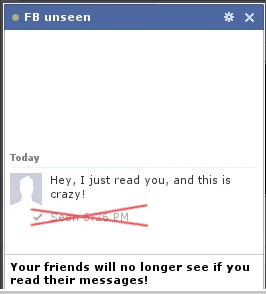
Hello reader’s today gonna share facebook trick. i think here is all are facebook user and use facebook allot and also chat with...
How To Disable Seen From Chat In Facebook
Step 1.
Step 2.
Step 3.
Hello Guys..I am going to tell you all about changing facebook password without knowing the current password…this is not a hack or ...
Change Your Facebook Password Without Knowing The Current Password
Hello Guys..I am going to tell you all about changing facebook password without knowing the current password…this is not a hack or something … i can simply call it a facebook’s own recovery tool
I will show you some snapshots too ..
- First go to address bar of any opened facebook account and type the following url
- Now Click Continue
- Then Again click Continue
- Boom…Bingo! you got the option of changing your password without asking for current password
great na
- Rest is in yours Hands.. keep on clicking continue and finally Log In... ENJOYYY
Most of you are already aware about this trick but most of you are still not, so those who are not aware can proceed further else...
Customize Your Facebook Chat Box and Drag It Anywhere [[ A Chrome Extension ]]
Download this chrome extension from below link and after installing, just refresh your home page and enjoy new and bigger Facebook chat box.